
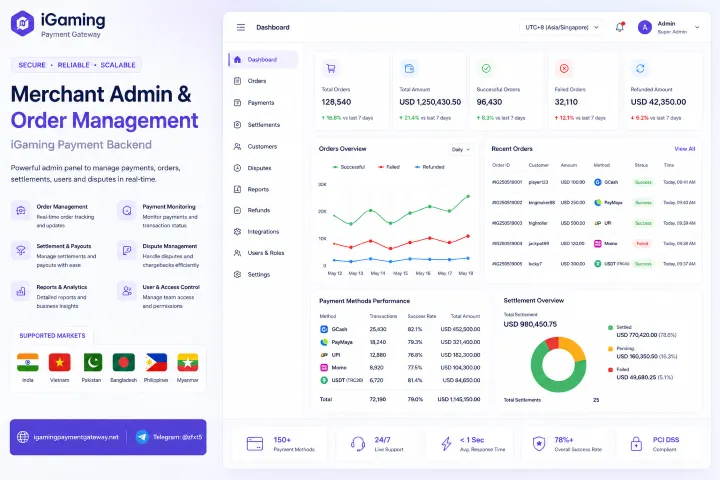
Merchant Admin & Order Management | iGaming Payment Backend: 8 Workflows the Operations Team Lives In and 4 Reports Finance Actually Reads
A merchant admin and order management backend for iGaming payments is where the operations team actually spends its working day. The player sees one button labelled "deposit." The team behind that button needs eight repeating workflows, four daily reports, a real search syntax, role-scoped access, and an audit trail that holds up when somebody asks "who refunded that transaction last Tuesday." If the admin panel is bad, every other thing about the gateway has to be incredible to compensate — and usually doesn't.
Pick any payment operator's Monday morning. Support is in the admin looking up a player who claims a deposit didn't land. Finance is in the same admin pulling settlement reports for last week. Risk is reviewing flagged withdrawals from the weekend. Engineering is checking webhook retry queues. Four people, four workflows, one back-end — and the quality of that back-end decides whether each of them ends the day frustrated.
Four Roles, Four Daily Views
A serious admin panel respects that "operator" isn't one person. It's a small team of distinct roles, each with a default landing view tailored to what they actually do. The honest cut of roles for a working iGaming payment operation:
Player lookup & ticket resolution
Settlement reconciliation & reporting
Flag review & KYC workflow
Integration health & webhook diagnostics
The Order Management View
The order list is the single most-used page in the panel. It's where support starts their day, where finance kicks off settlement queries, and where engineering investigates incidents. Get this page wrong and every workflow that depends on it suffers. The shape that works:
Search Syntax Built for Operations, Not for Marketing
The single biggest difference between a real operations back-end and a demo one is the search syntax. Operators don't search by a single keyword — they search by structured filters that combine market, method, time window, status, amount range, and player attributes. A serious admin supports this as a first-class query language:
Compound query example
status:
settled | pending | declined | held | refunded | reversed
market:
IN | PK | BD | VN | PH | MM — single or comma-separated
method:
upi | bkash | nagad | jazzcash | easypaisa | momo | zalopay | gcash | maya | kbzpay | wave
player:
player ID or phone / email match
amount:
> | < | between operators with currency-aware bounds
created:
relative (last 24h, this week) or absolute ISO ranges
The Order Detail View — Where Investigations Actually Happen
Clicking into a single order is where support and engineering investigations land. A useful detail view shows the player-facing facts, the gateway-side internals, the rail-level data, and the audit trail on one page — without the operator having to click through three sub-tabs to assemble the picture:
Player
Transaction
Risk & flags
Settlement
The 4 Reports Finance Actually Reads
Reports proliferate in admin panels — until you ask finance which ones they actually open. The honest answer for an iGaming payment operation is small: there are about four reports that get pulled regularly, and a long tail that gets pulled twice a year. The four:
Daily Settlement Roll-up
Yesterday's volume + fees + net per rail per market, ready for finance to import into the ledger.
Approval-Rate Monitor
Approval percentage per method per market over time. Surfaces a degrading route before finance feels the revenue impact.
Withdrawal Aging
Outstanding withdrawal requests by age bucket. Critical for trust posture — players notice payouts that drift past expected windows.
Risk Flag Disposition
Flags raised vs flags resolved, with average time-to-resolution. Tells the head of risk whether the team is keeping pace.
Role-Based Access Control That Reflects Reality
Admin panels often start with "admin or read-only" and stop there. A real iGaming operation needs more granular control — because the support engineer who looks up player history should not be able to issue a refund, and the finance lead who pulls settlement reports should not be able to lift a withdrawal hold. A working RBAC matrix:
| Capability | Support | Finance | Risk | Eng | Admin |
|---|---|---|---|---|---|
| View orders | ● | ● | ● | ● | ● |
| View player PII (full) | ◐ | ○ | ● | ○ | ● |
| Initiate refund | ◐ | ○ | ○ | ○ | ● |
| Approve refund | ○ | ● | ○ | ○ | ● |
| Release withdrawal hold | ○ | ○ | ● | ○ | ● |
| Export bulk data | ○ | ● | ● | ○ | ● |
| Manage API keys | ○ | ○ | ○ | ● | ● |
| Manage users & roles | ○ | ○ | ○ | ○ | ● |
Audit Trail — The Single Most Underrated Feature
"Who refunded that transaction last Tuesday?" is the question that decides whether an admin panel is a serious back-end or a hobbyist's dashboard. A real audit log captures every state-changing action with actor, target, before-and-after values, IP address, and a stable trace ID — and it is queryable, not just written to a log file nobody reads.
The Backend Stack Underneath
The features above don't exist in a vacuum — they sit on top of a working backend with real engineering attributes. A serious iGaming admin requires the following building blocks, each of which the player never sees but each of which the operations team's experience depends on:
Where the Admin Fits in the Bigger Picture
This article is deliberately the operator-side counterpart to our deep-dive on the player cashier UI for iGaming deposits and withdrawals. Same managed gateway, two different audiences: the player sees the cashier; the operator team sees the admin. Both surfaces are designed deliberately, both ship as part of the managed engagement, and both are first-class concerns rather than afterthoughts.
The infrastructure layers underneath the admin panel — the hosting, monitoring, on-call, durable queues, reconciliation pipelines — are detailed in our managed payment infrastructure article. The admin is the operator-facing window into that infrastructure; the infrastructure is what makes the window's content trustworthy.
Everything Else, Compressed
Scope of this article: The merchant admin and order-management back-end specifically — workflows by role, the order list, search syntax, detail view, reports, RBAC, and the audit trail. Player-side cashier UI is a separate article.
What we ship: the entire admin + back-end as part of the managed gateway — including the order ledger, query engine, reports, RBAC matrix, and audit log. Roles and permissions configurable per tenant.
Pricing: Flat monthly hosting fee + 0.1–0.4% transaction volume share. Admin tooling and ongoing feature development across the back-end are included, not separate line items.
Built for the team that opens the panel at 8 a.m. every Monday.
The admin and order back-end that actually survives a busy operations week.
See the Admin Walkthrough →Backend & Admin Specific Questions
Is the search engine truly indexed, or is it grepping the database every time?
Indexed. Order search is backed by a proper search index with sub-second response on typical queries even against multi-million-row history. Compound queries with multiple filters use the same engine, not separate scans.
How granular can RBAC actually go?
To the capability level shown in the matrix above, plus per-tenant scoping for PSPs running multiple downstream operators. A support user can be granted access to one downstream tenant's orders and not another's; an admin role can be scoped to a single market. Roles are composable rather than fixed.
Can the audit log be tampered with after the fact?
No. The audit log is append-only at the data layer; modifications produce a new event rather than overwriting an existing one. Hash chains over the log are available for tenants with stricter audit requirements.
What happens to data retention for orders and audit events?
Retention is configurable per tenant, with sensible defaults. Operational orders retain full detail for a defined window then transition to a compact aggregate; audit events are retained for the full audit period independently.
How do exports work for large date ranges?
Asynchronously. Large exports queue a job that produces a downloadable artifact when ready; the admin doesn't block the user's session for a multi-million-row CSV. Progress and completion are surfaced in the UI.
Does the admin expose webhook replay for engineering?
Yes. Engineering can replay individual webhooks against the downstream system, retry stalled deliveries, and inspect prior delivery attempts with full headers and bodies. Replays are recorded in the audit log.
Can we connect the admin to our existing finance / BI system?
The API surface that backs the admin views is also available externally with proper credentials. Most operators pull the four core reports above into their BI on a schedule rather than re-keying them; the admin and the BI agree because they're reading from the same underlying ledger.
The Next Step
A serious merchant admin and order management back-end for iGaming payments is not a dashboard, it's a workbench. Four roles use it differently; eight workflows recur every week; four reports are the ones finance actually opens; one audit log decides whether the back-end is trustworthy under scrutiny. Operators evaluating gateways should ask to be walked through the admin, not just the cashier — the cashier is what their player sees, but the admin is what their team will spend their lives in.
Tell us how your operations team is organised today, which workflows your current back-end makes painful, and what the existing audit trail looks like under a real question. We will walk through the admin against your specific operational reality, not a generic feature tour.
The admin your operations team would actually thank you for.
Backend tooling treated as engineering, not as a checkbox.
Walk Through the Admin →